
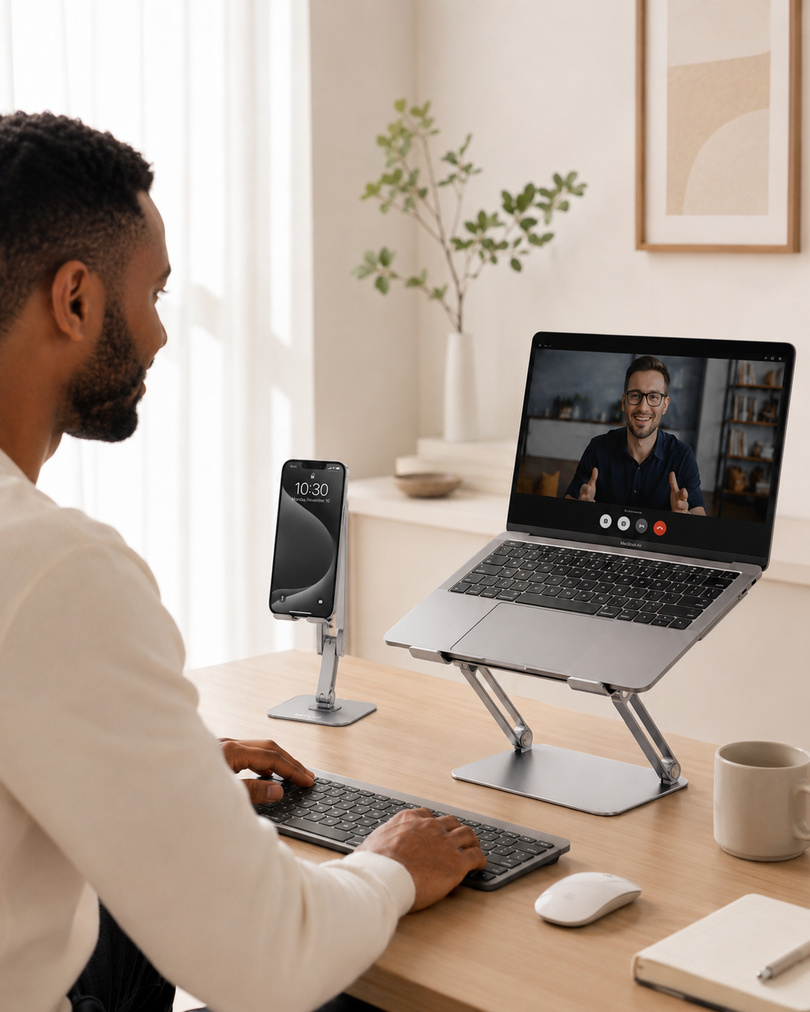







A Better Desk Setup Starts With How You Position Your Laptop
Whether you work from a home office, attend online meetings, study remotely, or simply spend hours browsing and creating content, your laptop position has a bigger impact than many people realize.
Most laptops are designed for portability, not long-term desktop comfort. When placed directly on a desk, the screen usually sits far below eye level, which can encourage users to lean forward and adjust their posture repeatedly throughout the day.
This is where an adjustable aluminum laptop stand can make a meaningful difference. By raising your laptop screen and creating a more comfortable viewing angle, a laptop stand helps transform a basic desk into a more ergonomic workspace.
For users looking to improve their daily setup, choosing the right laptop stand for desk use is less about adding another accessory and more about creating a healthier workflow.
What Does an Adjustable Laptop Stand Do?
An adjustable laptop stand is designed to elevate and position your laptop at a more comfortable height and angle.
Unlike fixed laptop risers, adjustable models allow users to customize the screen position depending on their working style, chair height, and desk environment.
A well-designed ergonomic laptop stand can help you:
- Bring your laptop closer to eye level
- Create a cleaner and more organized workspace
- Improve viewing comfort during long working sessions
- Make room underneath your laptop for better desk organization
- Build a dual-screen setup with an external monitor
For professionals working remotely, students attending online classes, and creators spending hours editing or designing, small ergonomic improvements can have a noticeable impact over time.
Why Aluminum Laptop Stands Are Popular for Modern Desks
Material choice matters when selecting a laptop riser.
An aluminum laptop stand offers several advantages compared with lightweight plastic alternatives.
1. Strong and Stable Support
A laptop stand needs to remain steady while typing, especially when using larger devices.
Aluminum construction provides a strong foundation while maintaining a premium, minimalist appearance that fits naturally into modern office setups.
The Lamicall adjustable aluminum laptop stand uses a sturdy aluminum structure designed to support laptops ranging from 10 inches to 17.3 inches, making it suitable for many popular laptop models, including MacBook, Dell, HP, Lenovo, and other brands.
2. Adjustable Height for Different Work Styles
Everyone’s workspace is different.
Some users prefer a lower angle for everyday typing, while others may want a higher position when pairing their laptop with an external keyboard and mouse.
A flexible adjustable laptop stand allows you to adapt your setup instead of adapting your body to your desk.
For example:
- Remote workers can create a more comfortable home office setup
- Students can improve their study desk arrangement
- Designers can adjust viewing angles for creative tasks
- Professionals can align laptops with external monitors
The Lamicall laptop stand supports multiple adjustable positions with a 90° adjustment design, allowing users to customize their preferred working angle.
How to Choose the Best Laptop Stand for Your Workspace
With many options available, choosing the right laptop stand depends on your daily needs.
Here are the key factors to consider.
1. Laptop Compatibility
Before purchasing a stand, check whether it supports your laptop size.
A versatile stand should work with different devices, from compact laptops to larger professional models.
For example, users searching for a laptop stand for MacBook should consider both size compatibility and stability, especially for larger MacBook Pro models.
The Lamicall adjustable stand is compatible with laptops between 10 and 17.3 inches, covering many common laptop categories.
2. Portability
A good workspace is not always fixed in one location.
Many professionals move between:
- Home offices
- Corporate offices
- Co-working spaces
- Meeting rooms
- Travel locations
A foldable portable laptop stand makes it easier to maintain a consistent setup wherever you work.
A compact design allows users to store the stand easily when not needed or carry it together with other work accessories.
3. Desk Space Optimization
Modern workspaces often include:
- Laptop
- Keyboard
- Mouse
- Monitor
- Charging accessories
- Notebook and other tools
A laptop riser helps create more usable space by lifting the computer away from the desk surface.
The open area underneath can be used for storage or simply create a cleaner visual layout.
Creating a More Comfortable Home Office Setup
A laptop stand is often one part of a complete ergonomic workspace.
A practical home office setup usually combines:
Laptop Stand
Raises the screen and improves viewing position.
External Keyboard and Mouse
Allows more flexible hand positioning when the laptop is elevated.
Monitor Setup
Creates a larger viewing area for multitasking.
Organized Desk Accessories
Keeps frequently used items within reach without creating clutter.
For users building a complete workstation, exploring different desk accessories for productivity can help create a more efficient daily environment.
Is an Adjustable Laptop Stand Worth It?
For many laptop users, the answer depends on how often they use their device.
An adjustable laptop stand can be especially valuable for:
- People working on laptops several hours per day
- Remote employees
- Students attending online classes
- Designers and content creators
- Anyone building a cleaner desk setup
It may not replace every ergonomic improvement, but it is a simple upgrade that can improve the overall experience of using a laptop at a desk.
Frequently Asked Questions About Adjustable Laptop Stands
Are aluminum laptop stands safe for MacBooks?
Yes. Aluminum laptop stands are commonly used with MacBook models because they provide strong support while matching the premium design style of Apple devices.
A compatible stand should include protective pads to help prevent scratches and keep the laptop stable.
Can a laptop stand improve cooling?
Many laptop stands create additional airflow space underneath the laptop.
While a stand is not a replacement for dedicated cooling solutions, raising the laptop from the desk surface may help improve ventilation compared with placing it completely flat.
What size laptop works with an adjustable laptop stand?
Most adjustable laptop stands support a range of laptop sizes.
The Lamicall adjustable aluminum laptop stand supports devices from 10 inches to 17.3 inches, making it suitable for many everyday laptops and professional notebooks.
Should I use a laptop stand with an external keyboard?
For elevated laptop setups, many users prefer pairing a laptop stand with an external keyboard and mouse.
This allows the screen to stay higher while keeping typing positions more comfortable.
Upgrade Your Everyday Laptop Experience With a Smarter Desk Setup
A laptop is designed to be portable, but your workspace does not have to sacrifice comfort.
Adding the right adjustable aluminum laptop stand can help create a cleaner, more flexible, and more personalized working environment.
Whether you are building a home office, improving a study desk, or creating a professional workstation, the right laptop stand can become a simple but valuable part of your everyday setup.
A better desk experience often starts with one small change: putting your laptop in the right position.